 VirtualMemory
| Deskbar: | ||
| Location: | /boot/system/preferences/VirtualMemory | |
| Settings: | ~/config/settings/kernel/drivers/virtual_memory ~/config/settings/VM_data - Lagrar panelens fönsterposition. |
Virtuellt minne låter systemet temporärt lägga ut data på hårddisken om RAM-minnet kan utnyttjas bättre till något annat. Så även om du har massor av RAM är det aldrig en dålig idé att avsätta virtuellt minne.
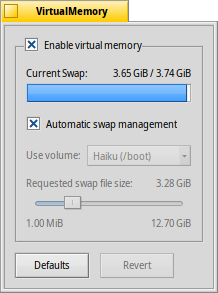
Normally, the swap file is written to the boot partition. If you're running low on free memory there, you can deactivate the and choose another mounted partition from the popup menu. The swap file size is set with the slider below.
If you often run into disk thrashing due to the virtual memory system swapping memory in and out, you can try to use a separate harddisk for you swap file to avoid I/O congestion. Simply another partition on the same harddisk with your system/data won't help. Upgrading your RAM is of course the most effective way to go...
| återställer allt till standardinställningarna. | ||
| ställer tillbaka inställningarna som de var när du startade intällningarna för VirtualMemory. |